Virtual declutter for occupied listing photos
Most homes sell while people still live in them. That means listing photos often show moving boxes, kids' toys, laundry piles and crowded counters. RoomGenix Declutter takes those items out of the photo you already shot and leaves the furniture that is really there, so buyers can see the rooms without a second clean-up shoot.
Why declutter photos matter on an occupied listing
Buyers know the sellers live there. What they struggle with is reading the space when every surface is covered. A dining table stacked with mail, a hallway full of shoes, or a bedroom corner used for storage all steal attention from the room itself. Soft decluttering in the photo helps the listing show the home as a place to live, not as a work-in-progress.
A physical declutter before the shoot is still the gold standard. Virtual declutter is for the shots you already took, the rooms that never quite got cleared, or the listings where a full pack-out was never realistic. It is a photo edit, not a substitute for a tidy house at the showing.
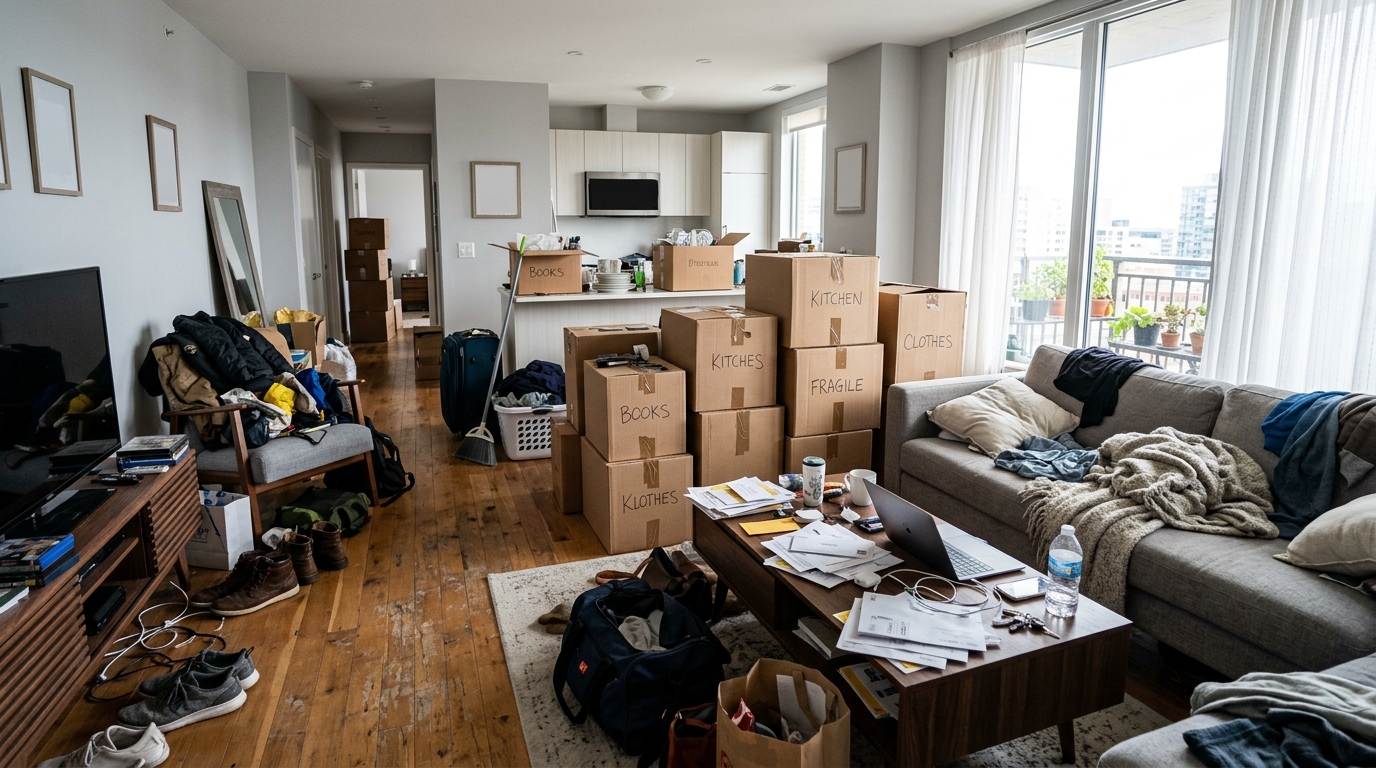
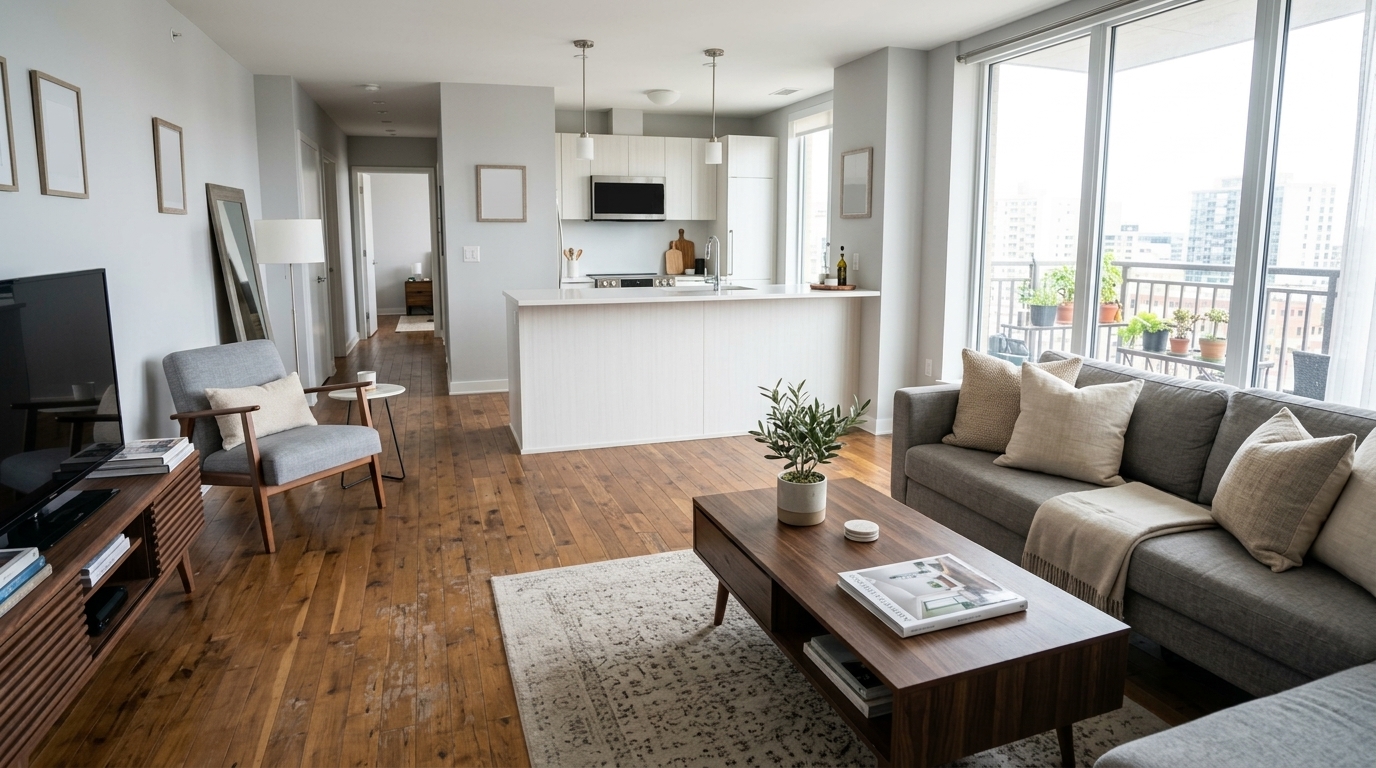
Studio examples, not a client listing.
How to declutter a listing photo
- Upload the occupied photo. Use the JPG, PNG or WEBP you already shot. A clear view of the floor and the main surfaces gives the studio the most to work with.
- Pick Declutter as the job. Room type and style are not used for Declutter, because nothing is being furnished.
- Review and download. A result is usually ready in a minute or two. If something that should stay was removed, or a wall or window shifted, run it again or email [email protected].
The studio is built to remove items from the photo you uploaded rather than redraw the room. Walls, windows, flooring and the furniture that belongs in the shot are meant to stay as they are. Check every result before you publish it.
What Declutter is for, and what it is not
- Good targets: moving boxes, trash bags, toys, laundry piles, cables, personal photos, and small clutter on counters or floors.
- Leave the real furniture. Declutter should not invent a new sofa or erase a built-in. If you want empty rooms with new furniture, use Stage on a vacant photo instead.
- Do not hide defects. Never use declutter to cover water stains, cracked tiles, damaged walls or missing fixtures. Buyers will see those at the showing.
- People and pets. If someone or a pet is in the frame, treat the result carefully. Many MLSs want people removed from listing photos or want the edit disclosed.
When to declutter vs stage
Use Declutter when the home is occupied and you want buyers to see the sellers' real layout, just cleaner. Use Stage when a room is empty and you want to show how it could be furnished. Some listings mix both: declutter the lived-in rooms that look busy, and stage the vacant ones. Keep labels honest for each photo.
If a spare room is empty and better sold as a workspace, the home office or bedroom room types are the right tools. Declutter will not add a desk or a bed.
Disclosure and MLS rules
Removing objects from a photo is still an edit. Many MLSs require virtually altered photos to be labeled, and some want the original included in the gallery. RoomGenix does not print a label on the file, so add one in the listing caption or remarks. The MLS photo rules page is a reminder, not legal advice. Check your own board before the listing goes live.
What it costs
A declutter photo uses one credit, the same as staging a room. A new account gets 3 watermarked previews with no card, so you can try your own occupied photos first. After that a photo is $2.99, or less in a pack: $19 for 8 photos, $49 for 25, or $99 for 60. There is no subscription and credits don't expire. See pricing for the current list.
Pair it with the rest of the listing
Declutter works well alongside Stage and Twilight. Clean up the lived-in rooms, stage the empty ones, and use a twilight exterior for the cover if you want an evening hero shot. One credit covers each photo, and pack credits stay on the account until you use them.
Questions
What does virtual declutter do?
It removes clutter and personal items from an occupied listing photo while leaving the furniture that is really there, so buyers can read the room more clearly.
Will the furniture in the room change?
Declutter is meant to take items out, not replace the furniture. If a sofa, bed or built-in disappears or a wall moves, do not list that file.
How much does a declutter photo cost?
A declutter photo uses one credit. A new account gets 3 free watermarked previews, then a photo is $2.99 or less in a pack.
Do I pick a room type or style for Declutter?
No. Room type and style are only used when staging a room.
Do I need to label a decluttered photo?
Many MLSs treat decluttering as a photo edit and ask for a label, and some want the original included. Check your local rules before the listing goes live.